Activity 15: Angular with TypeScript and data structures

To apply the learning from your previous lesson on Angular with TypeScript and data structures, you’ll implement an array or list similar to the example provided, using strings or numbers. The goal of this activity is to practice manipulating arrays in TypeScript, such as adding new data and fetching it from an array, through 50 different scenarios.
Step 1: I created a folder named Angular-TypeScript-Datastructures for this activity in the command prompt and install the needed packages.
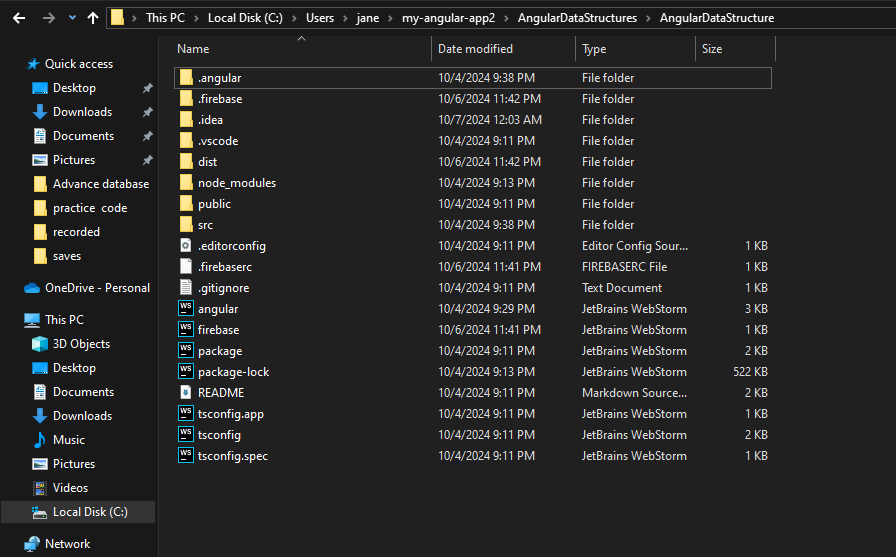
Step 2: inside the src folder, the app folder , I created a folder named components
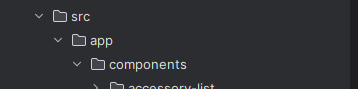
Step 3: Inside this of components folder, I use the terminal to generate 50 components each.
use ng generate component components/nameofthecomponentlist
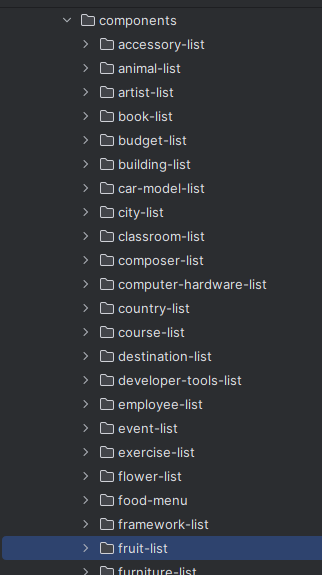
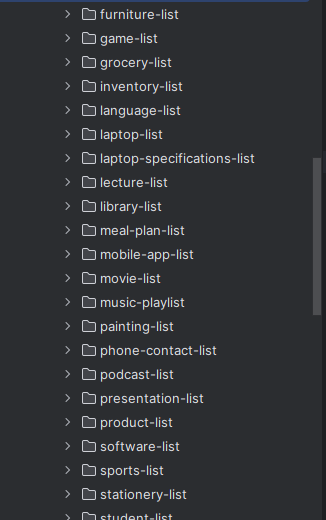
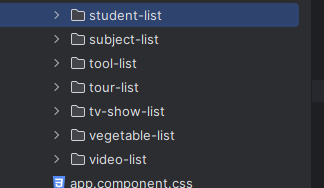
Step 4: I created a app.module.ts to set up, and configure the routes, imports, and declarations.

import { Component, NgModule } from "@angular/core"
import { AppComponent } from "./app.component"
import { RouterModule, Routes } from "@angular/router";
import { CommonModule } from "@angular/common";
import { BrowserModule } from "@angular/platform-browser";
import { BrowserAnimationsModule } from "@angular/platform-browser/animations";
import { FormsModule } from "@angular/forms";
import {StudentListComponent} from "./components/student-list/student-list.component";
import {EmployeeListComponent} from "./components/employee-list/employee-list.component";
import {FruitListComponent} from "./components/fruit-list/fruit-list.component";
import {CourseListComponent} from "./components/course-list/course-list.component";
import {BookListComponent} from "./components/book-list/book-list.component";
import {CityListComponent} from "./components/city-list/city-list.component";
import {MovieListComponent} from "./components/movie-list/movie-list.component";
import {CarModelListComponent} from "./components/car-model-list/car-model-list.component";
import {ProductListComponent} from "./components/product-list/product-list.component";
import {SubjectListComponent} from "./components/subject-list/subject-list.component";
import {CountryListComponent} from "./components/country-list/country-list.component";
import {SportsListComponent} from "./components/sports-list/sports-list.component";
import {VegetableListComponent} from "./components/vegetable-list/vegetable-list.component";
import {AnimalListComponent} from "./components/animal-list/animal-list.component";
import {ToolListComponent} from "./components/tool-list/tool-list.component";
import {LanguageListComponent} from "./components/language-list/language-list.component";
import {GameListComponent} from "./components/game-list/game-list.component";
import {SoftwareListComponent} from "./components/software-list/software-list.component";
import {PhoneContactListComponent} from "./components/phone-contact-list/phone-contact-list.component";
import {MusicPlaylistComponent} from "./components/music-playlist/music-playlist.component";
import {FoodMenuComponent} from "./components/food-menu/food-menu.component";
import {GroceryListComponent} from "./components/grocery-list/grocery-list.component";
import {ClassroomListComponent} from "./components/classroom-list/classroom-list.component";
import {InventoryListComponent} from "./components/inventory-list/inventory-list.component";
import {LectureListComponent} from "./components/lecture-list/lecture-list.component";
import {StationeryListComponent} from "./components/stationery-list/stationery-list.component";
import {FlowerListComponent} from "./components/flower-list/flower-list.component";
import {DestinationListComponent} from "./components/destination-list/destination-list.component";
import {LaptopListComponent} from "./components/laptop-list/laptop-list.component";
import {LaptopSpecificationsListComponent} from "./components/laptop-specifications-list/laptop-specifications-list.component";
import {ComputerHardwareListComponent} from "./components/computer-hardware-list/computer-hardware-list.component";
import {MobileAppListComponent} from "./components/mobile-app-list/mobile-app-list.component";
import {VideoListComponent} from "./components/video-list/video-list.component";
import {TVShowListComponent} from "./components/tv-show-list/tv-show-list.component";
import {FurnitureListComponent} from "./components/furniture-list/furniture-list.component";
import {AccessoryListComponent} from "./components/accessory-list/accessory-list.component";
import {BuildingListComponent} from "./components/building-list/building-list.component";
import {PaintingListComponent} from "./components/painting-list/painting-list.component";
import {ArtistListComponent} from "./components/artist-list/artist-list.component";
import {ComposerListComponent} from "./components/composer-list/composer-list.component";
import {PodcastListComponent} from "./components/podcast-list/podcast-list.component";
import {ExerciseListComponent} from "./components/exercise-list/exercise-list.component";
import {MealPlanListComponent} from "./components/meal-plan-list/meal-plan-list.component";
import {BudgetListComponent} from "./components/budget-list/budget-list.component";
import {PresentationListComponent} from "./components/presentation-list/presentation-list.component";
import {TourListComponent} from "./components/tour-list/tour-list.component";
import {EventListComponent} from "./components/event-list/event-list.component";
import {DeveloperToolsListComponent} from "./components/developer-tools-list/developer-tools-list.component";
import {FrameworkListComponent} from "./components/framework-list/framework-list.component";
import {LibraryListComponent} from "./components/library-list/library-list.component";


const routes: Routes = [
  {path: '', component: StudentListComponent},
  {path: 'employee-list', component: EmployeeListComponent},
  {path: 'fruit-list', component: FruitListComponent},
  {path: 'course-list', component: CourseListComponent},
  {path: 'book-list', component: BookListComponent},
  {path: 'city-list', component: CityListComponent},
  {path: 'movie-list', component: MovieListComponent},
  {path: 'car-model-list', component: CarModelListComponent},
  {path: 'product-list', component: ProductListComponent},
  {path: 'subject-list', component: SubjectListComponent},
  {path: 'country-list', component: CountryListComponent},
  {path: 'sports-list', component: SportsListComponent},
  {path: 'vegetable-list', component: VegetableListComponent},
  {path: 'animal-list', component: AnimalListComponent},
  {path: 'tool-list', component: ToolListComponent},
  {path: 'language-list', component: LanguageListComponent},
  {path: 'game-list', component: GameListComponent},
  {path: 'software-list', component: SoftwareListComponent},
  {path: 'phone-contact-list', component: PhoneContactListComponent},
  {path: 'music-playlist', component: MusicPlaylistComponent},
  {path: 'food-menu', component: FoodMenuComponent},
  {path: 'grocery-list', component:GroceryListComponent},
  {path: 'classroom-list', component:ClassroomListComponent},
  {path: 'inventory-list', component:InventoryListComponent},
  {path: 'lecture-list', component:LectureListComponent},
  {path: 'lecture-list', component:LectureListComponent},
  {path: 'stationery-list', component:StationeryListComponent},
  {path: 'flower-list', component:FlowerListComponent},
  {path: 'destination-list', component:DestinationListComponent},
  {path: 'laptop-list', component:LaptopListComponent},
  {path: 'laptop-specifications-list', component:LaptopSpecificationsListComponent},
  {path: 'computer-hardware-list', component:ComputerHardwareListComponent},
  {path: 'mobile-app-list', component:MobileAppListComponent},
  {path: 'video-list', component:VideoListComponent},
  {path: 'tv-show-list', component:TVShowListComponent},
  {path: 'furniture-list', component:FurnitureListComponent},
  {path: 'accessory-list', component:AccessoryListComponent},
  {path: 'building-list', component:BuildingListComponent},
  {path: 'painting-list', component:PaintingListComponent},
  {path: 'artist-list', component:ArtistListComponent},
  {path: 'composer-list', component:ComposerListComponent},
  {path: 'podcast-list', component:PodcastListComponent},
  {path: 'exercise-list', component:ExerciseListComponent},
  {path: 'meal-plan-list', component:MealPlanListComponent},
  {path: 'budget-list', component:BudgetListComponent},
  {path: 'presentation-list', component:PresentationListComponent},
  {path: 'tour-list', component:TourListComponent},
  {path: 'event-list', component:EventListComponent},
  {path: 'developer-tools-list', component:DeveloperToolsListComponent},
  {path: 'framework-list', component:FrameworkListComponent},
  {path: 'library-list', component:LibraryListComponent},


]

@NgModule ({
  imports: [
    CommonModule,
    BrowserModule,
    BrowserAnimationsModule,
    RouterModule.forRoot(routes, {enableTracing: true}),
    FormsModule,
  ],

  declarations: [
    AppComponent,
    StudentListComponent,
    EmployeeListComponent,
    FruitListComponent,
    CourseListComponent,
    BookListComponent,
    CityListComponent,
    MovieListComponent,
    CarModelListComponent,
    ProductListComponent,
    SubjectListComponent,
    CountryListComponent,
    SportsListComponent,
    VegetableListComponent,
    AnimalListComponent,
    ToolListComponent,
    LanguageListComponent,
    GameListComponent,
    SoftwareListComponent,
    PhoneContactListComponent,
    MusicPlaylistComponent,
    FoodMenuComponent,
    GroceryListComponent,
    ClassroomListComponent,
    InventoryListComponent,
    LectureListComponent,
    StationeryListComponent,
    FlowerListComponent,
    DestinationListComponent,
    LaptopListComponent,
    LaptopSpecificationsListComponent,
    ComputerHardwareListComponent,
    MobileAppListComponent,
    VideoListComponent,
    TVShowListComponent,
    FurnitureListComponent,
    AccessoryListComponent,
    BuildingListComponent,
    PaintingListComponent,
    ArtistListComponent,
    ComposerListComponent,
    PodcastListComponent,
    ExerciseListComponent,
    MealPlanListComponent,
    BudgetListComponent,
    PresentationListComponent,
    TourListComponent,
    EventListComponent,
    DeveloperToolsListComponent,
    FrameworkListComponent,
    LibraryListComponent,


  ],

  providers: [

  ],

  bootstrap: [
    AppComponent
  ]
})

export class AppModule {}
Step 5: I modified the app.component.html to connect all of the components using navbar and routerlink.
<nav>
  <ul>
    <li><a routerLink="">1.Student List</a></li>
    <li><a routerLink="employee-list">#2.EmployeeList</a></li>
    <li><a routerLink="fruit-list">#3.FruitList</a></li>
    <li><a routerLink="course-list">#4.Courselist</a></li>
    <li><a routerLink="book-list">#5.BookList</a></li>
    <li><a routerLink="city-list">#6.CityList</a></li>
    <li><a routerLink="movie-list">#7.MovieList</a></li>
    <li><a routerLink="car-model-list">#8.CarModelList</a></li>
    <li><a routerLink="product-list">#9.ProductList</a></li>
    <li><a routerLink="subject-list">#10.SubjectList</a></li>
    <li><a routerLink="country-list">#11.CountryList</a></li>
    <li><a routerLink="sports-list">#12.SportsList</a></li>
    <li><a routerLink="vegetable-list">#13.VegetableList</a></li>
    <li><a routerLink="animal-list">#14.AnimalList</a></li>
    <li><a routerLink="tool-list">#15.ToolList</a></li>
    <li><a routerLink="language-list">#16.LanguageList</a></li>
    <li><a routerLink="game-list">#17.GameList</a></li>
    <li><a routerLink="software-list">#18.SoftwareList</a></li>
    <li><a routerLink="phone-contact-list">#19.PhoneContactList</a></li>
    <li><a routerLink="music-playlist">#20.music-playlist</a></li>
    <li><a routerLink="food-menu">#21.food-menu</a></li>
    <li><a routerLink="grocery-list">#22.GroceryList</a></li>
    <li><a routerLink="classroom-list">#23.ClassroomList</a></li>
    <li><a routerLink="inventory-list">#24.InventoryList</a></li>
    <li><a routerLink="lecture-list">#25.LectureList</a></li>
    <li><a routerLink="stationery-list">#26.StationeryList</a></li>
    <li><a routerLink="flower-list">#27.FlowerList</a></li>
    <li><a routerLink="destination-list">#28.DestinationList</a></li>
    <li><a routerLink="laptop-list">#29.LaptopList</a></li>
    <li><a routerLink="laptop-specifications-list">#30.LaptopSpecificationsList</a></li>
    <li><a routerLink="computer-hardware-list">#31.ComputerHardwareList</a></li>
    <li><a routerLink="mobile-app-list">#32.MobileAppList</a></li>
    <li><a routerLink="video-list">#33.VideoList</a></li>
    <li><a routerLink="tv-show-list">#34.TvShowList</a></li>
    <li><a routerLink="furniture-list">#35.FurnitureList</a></li>
    <li><a routerLink="accessory-list">#36.AccessoryList</a></li>
    <li><a routerLink="building-list">#37.BuildingList</a></li>
    <li><a routerLink="painting-list">#38.PaintingList</a></li>
    <li><a routerLink="artist-list">#39.ArtistList</a></li>
    <li><a routerLink="composer-list">#40.ComputerList</a></li>
    <li><a routerLink="podcast-list">#41.PodcastList</a></li>
    <li><a routerLink="exercise-list">#42.ExerciseList</a></li>
    <li><a routerLink="meal-plan-list">#43.MealPlanList</a></li>
    <li><a routerLink="budget-list">#44.BudgetList</a></li>
    <li><a routerLink="presentation-list">#45.PresentationList</a></li>
    <li><a routerLink="tour-list">#46.TourList</a></li>
    <li><a routerLink="event-list">#47.EventList</a></li>
    <li><a routerLink="developer-tools-list">#48.DeveloperToolsList</a></li>
    <li><a routerLink="framework-list">#49.FrameworkList</a></li>
    <li><a routerLink="library-list">#50.LibraryList</a></li>


  </ul>
</nav>
<router-outlet></router-outlet>
Step 6: Lastly, I pushed and committed each of the components in my GitHub repository.
git add .
git commit -m "#name of components"
git push -u origin main
Firebase Hosting
First created a project in Firebase website called "maitom-activity15"
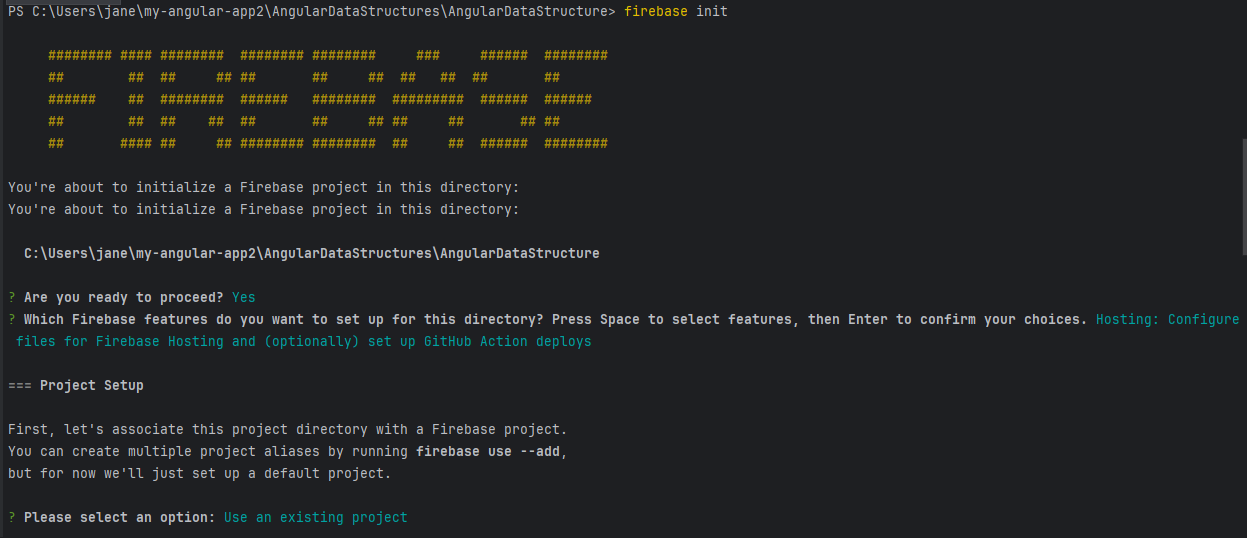
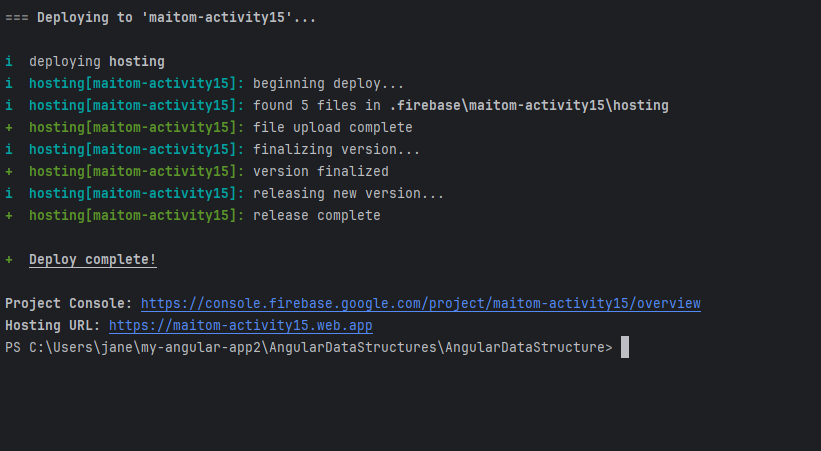
The next thing I did was run the firebase init command. This initialized Firebase services in my project, allowing me to choose the features I wanted to use, and hosting to set up my project for deployment.
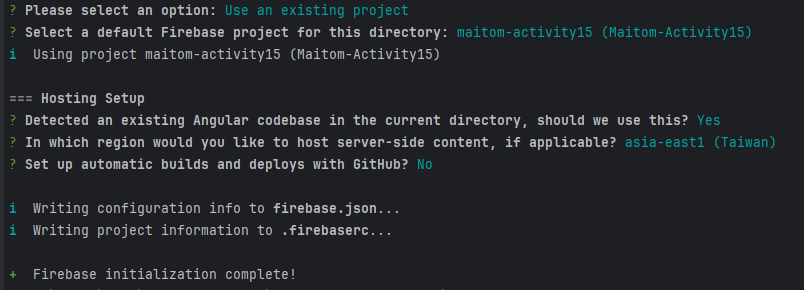
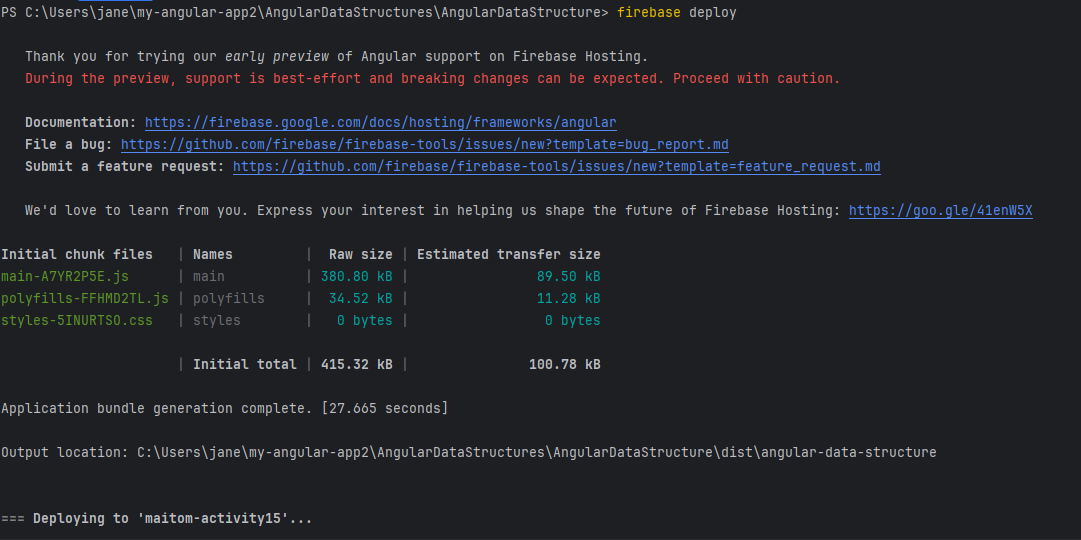
Finally, I ran the firebase deploy command to upload my project to Firebase. This step published my Angular app online, making it accessible through the Firebase hosting service.
Student List – Manage a list of students.
Employee List – Manage a list of employees.
Fruit List – List different types of fruits.
Course List – List of courses offered in a school.
Book List – List of books in a library.
City List – List of cities a company operates in.
Movie List – List of movies in a theater.
Car Model List – List of car models available at a dealership.
Product List – List of products sold in a store.
Subject List – List of subjects taught in a semester.
Country List – List of countries by continent.
Sports List – List of popular sports.
Vegetable List – List of vegetables available at a grocery store.
Animal List – List of animals in a zoo.
Tool List – List of tools used in a workshop.
Language List – List of programming languages.
Game List – List of video games.
Software List – List of software installed on a computer.
Phone Contact List – List of phone contacts.
Music Playlist – List of songs in a playlist.
Food Menu – List of food items on a restaurant menu.
Grocery List – List of items to buy in a grocery store.
Classroom List – List of students in a classroom.
Inventory List – List of items in a store’s inventory.
Lecture List – List of lectures scheduled for a course.
Stationery List – List of office stationery.
Flower List – List of flowers for a wedding.
Destination List – List of travel destinations.
Laptop List – List of laptop models.
Laptop Specifications List – List of laptop specifications.
Computer Hardware List – List of computer components.
Mobile App List – List of apps on a phone.
Video List – List of videos in a library.
TV Show List – List of TV shows available for streaming.
Furniture List – List of furniture items in a store.
Accessory List – List of accessories for mobile phones.
Building List – List of buildings in a campus.
Painting List – List of famous paintings.
Artist List – List of famous artists.
Composer List – List of famous music composers.
Podcast List – List of podcast episodes.
Exercise List – List of exercises for a workout routine.
Meal Plan List – List of meals in a weekly plan.
Budget List – List of budget items for a project.
Presentation List – List of presentation topics.
Tour List – List of tour dates for a band.
Event List – List of upcoming events.
Developer Tools List – List of software developer tools.
Framework List – List of web development frameworks.
Library List – List of libraries used in a project.
Repository: https://github.com/ChristineMaitom/AngularDataStructures